This is absolutely great. Our good Captain Reynolds to the rescue. Gamers and Geeks owe him a lifetime debt for this simple solution to one of our most plaguing problems.
Saturday, July 9, 2011

Tuesday, February 8, 2011



Sunday, January 2, 2011
The New Year A*****e
My second reaction was to fire myself from #sabayon, with thanks to someone I respect to get me thinking outside my ego. I promptly did so, you can find the thread on the mailing list. Several conversations with the team members and project lead talked me out of removing myself and to chalk it up as a lesson learned. I had to sleep on that one, but decided that if they were still willing to have me I had more to offer.
I have no excuses for my reactions and comments, there can be none. What I did was uncalled for and for that I apologize to sje46 and to my team mates at Sabayon. To sje46 I invite you back so that I may apologize to you. Either in #sabayon-social or #sabayon-dev, I am stepping away from #sabayon for awhile to regain some perspective.
Sorry you wont find me posting this in the same manner you chose to. Your decision on location to vent your justified frustration is a place I usually wont touch with a ten meter cattle prod. I will hope that through the various internet channels that it will get back to you.
nuff said.
~Az
I have no excuses for my reactions and comments, there can be none. What I did was uncalled for and for that I apologize to sje46 and to my team mates at Sabayon. To sje46 I invite you back so that I may apologize to you. Either in #sabayon-social or #sabayon-dev, I am stepping away from #sabayon for awhile to regain some perspective.
Sorry you wont find me posting this in the same manner you chose to. Your decision on location to vent your justified frustration is a place I usually wont touch with a ten meter cattle prod. I will hope that through the various internet channels that it will get back to you.
nuff said.
~Az
Monday, December 27, 2010
Free Markets? HAH!!!
I was asked, do I really think we don't have free markets. That it is free market that has landed us where we are now, isnt it?
No, since the base of all business has been under federal control for the last 70 years. They have been following the meanderings of Keynesian economics which demand the use of supply side averaging while ignoring 2 major facts. 1: that keynes averaging ignores 40% of the economy in entrepreneurs, and 2: that propping up the supply to await a return of consumer demand. This presupposes that consumer habits will return to the previously wasteful and unsustainable habits of debt loading that were in place before.
It also relies on the fact that most will never take the time to understand what inflation actually is. If the Fed controls the printing of money, yet in no public sector do wages track 1:1, where does the difference in actual value go? Not to the people, this is obvious. Not to the businesses, as for them to get it, it must also come from consumers (who didnt already get it). Therefor the difference in actual value must remain with those in charge of printing the money, the difference stays with the government.
At the rate of 2% (Bernankes stated wish for stable inflation) we can compound that out to see a doubling of consumer prices over around 35 years. (Reality would show that it is actually much faster), so where does that difference go? Thats right, right back into the government coffers.
So in that mess, with the fed on control of every basic aspect and control of trade, from artificially controlling interest rates by fiat, to the rate of inflation, we have had free markets? We have had government setting up a business environment that is conducive to the return of the robber barons, but not free markets. Note that this has been constant regardless of who is in the white house or what party has control of congress.
No, since the base of all business has been under federal control for the last 70 years. They have been following the meanderings of Keynesian economics which demand the use of supply side averaging while ignoring 2 major facts. 1: that keynes averaging ignores 40% of the economy in entrepreneurs, and 2: that propping up the supply to await a return of consumer demand. This presupposes that consumer habits will return to the previously wasteful and unsustainable habits of debt loading that were in place before.
It also relies on the fact that most will never take the time to understand what inflation actually is. If the Fed controls the printing of money, yet in no public sector do wages track 1:1, where does the difference in actual value go? Not to the people, this is obvious. Not to the businesses, as for them to get it, it must also come from consumers (who didnt already get it). Therefor the difference in actual value must remain with those in charge of printing the money, the difference stays with the government.
At the rate of 2% (Bernankes stated wish for stable inflation) we can compound that out to see a doubling of consumer prices over around 35 years. (Reality would show that it is actually much faster), so where does that difference go? Thats right, right back into the government coffers.
So in that mess, with the fed on control of every basic aspect and control of trade, from artificially controlling interest rates by fiat, to the rate of inflation, we have had free markets? We have had government setting up a business environment that is conducive to the return of the robber barons, but not free markets. Note that this has been constant regardless of who is in the white house or what party has control of congress.
Wednesday, January 13, 2010
Watching TV and Linux
This all started a couple of weeks ago when I finally got around to putting the tv capture card I had picked up a year or two ago into my computer. Happily like most things in Linux, it just worked, that was a great plus. Sadly the software packages in existence that I ran across were either too much or too little, nothing was just right.
What I wanted was to be able to open up a window, tack it to the desktop in always on top mode, and leave it in the corner taking up some but not all of my screen real estate. I also wanted the ability to pause it, so that I could get up, grab a cup of coffee, hit the head, or what ever. Guess what, this falls into the "good luck with that" category of having had someone scratch that particular coding itch.
For the watching TV in a window, I found several applications, such as tvtime and xawtv. Both are good and configurable. Excellent for what they were designed for which was simply just watching TV, either in a window or fullscreen. Sadly of all of the light weight applications I played with they all lacked the second critical function, the ability to pause. So while I decided to keep tvtime on my system because it is rather a nice piece of software the search must continue.
I decided then to explore mythtv. I had read about it several times over the years and finally had a reason to do more than think about it. I knew that it had the ability to record TV, watch movies, and basically handle being a home theater system. Holy unfriendly overkill batman. By the time I had it compiled (I was doing this on a Funtoo system) I was mildly annoyed at the collection of dependencies that had to be pulled in. That annoyance was nothing compared to trying to configuring it.
Between the documentation, complete and utter lack of editable configuration files, a configuration UI that is among the unfriendliest and unintuitive I have ever seen, and an IRC help channel slightly less friendly than the Spanish Inquisition. I think maybe I would prefer to spend a month at a nudist colony with a porcupine infestation than get near that project again.
OK, enough of a sideline about mythtv, needless to say I did get it up and running. I then decided that while it was not completely unsuited to that task at hand, it was exactly what I did not want. Not to mention it still didn't do exactly what I wanted. Which was simply a window in the corner that I could play/pause.
** It was brought to my attention that mythtv will indeed start in a windowed mode
** thanks for correcting my misstatement Dinotrac. Still it's a level of overkill I do not need.
So I decided to set about doing for myself what I could not find an existing application for. While I had been playing with the capture card and software for it, I found that I could watch TV using mplayer, or record TV using mencoder (part of mplayer). Armed with this dangerous knowledge I figured I could wrap everything up in a script to do what I wanted. I was right too. With one script I can watch TV, play/pause, and as an added bonus, when I close the window I was using to watch TV, it asks me if I want to save the streams I had been watching.
There are only two packages that you need for this script, mplayer and xdialog. Actually xdialog is only if you want it to ask you if you want to save the streams and easy file clean up. Alternately you could just change that portion of the script to : rm $location/$filename.avi to have it clean out all the files when you shut mplayer off.
So here you go:
Click here for the script
UPDATE:
Added file rename when save file is selected. Cleaned up spurious text for those using dialog rather than xdialog. Broke up the mencoder command for easier reading and added deinterlacing to it.
Version 2 of the script
Blogspot mangles code snippets, so its in a pastebin. Personally I dropped the script into /usr/bin/ did chmod 755 on it, and use it as I would any other program. So you could make a desktop shortcut, add it to a menu or do what I did. I mapped it to a spare unused key on my keyboard, so now I have TV at the push of one button.

What I wanted was to be able to open up a window, tack it to the desktop in always on top mode, and leave it in the corner taking up some but not all of my screen real estate. I also wanted the ability to pause it, so that I could get up, grab a cup of coffee, hit the head, or what ever. Guess what, this falls into the "good luck with that" category of having had someone scratch that particular coding itch.
For the watching TV in a window, I found several applications, such as tvtime and xawtv. Both are good and configurable. Excellent for what they were designed for which was simply just watching TV, either in a window or fullscreen. Sadly of all of the light weight applications I played with they all lacked the second critical function, the ability to pause. So while I decided to keep tvtime on my system because it is rather a nice piece of software the search must continue.
I decided then to explore mythtv. I had read about it several times over the years and finally had a reason to do more than think about it. I knew that it had the ability to record TV, watch movies, and basically handle being a home theater system. Holy unfriendly overkill batman. By the time I had it compiled (I was doing this on a Funtoo system) I was mildly annoyed at the collection of dependencies that had to be pulled in. That annoyance was nothing compared to trying to configuring it.
Between the documentation, complete and utter lack of editable configuration files, a configuration UI that is among the unfriendliest and unintuitive I have ever seen, and an IRC help channel slightly less friendly than the Spanish Inquisition. I think maybe I would prefer to spend a month at a nudist colony with a porcupine infestation than get near that project again.
OK, enough of a sideline about mythtv, needless to say I did get it up and running. I then decided that while it was not completely unsuited to that task at hand, it was exactly what I did not want. Not to mention it still didn't do exactly what I wanted. Which was simply a window in the corner that I could play/pause.
** It was brought to my attention that mythtv will indeed start in a windowed mode
** thanks for correcting my misstatement Dinotrac. Still it's a level of overkill I do not need.
So I decided to set about doing for myself what I could not find an existing application for. While I had been playing with the capture card and software for it, I found that I could watch TV using mplayer, or record TV using mencoder (part of mplayer). Armed with this dangerous knowledge I figured I could wrap everything up in a script to do what I wanted. I was right too. With one script I can watch TV, play/pause, and as an added bonus, when I close the window I was using to watch TV, it asks me if I want to save the streams I had been watching.
There are only two packages that you need for this script, mplayer and xdialog. Actually xdialog is only if you want it to ask you if you want to save the streams and easy file clean up. Alternately you could just change that portion of the script to : rm $location/$filename.avi to have it clean out all the files when you shut mplayer off.
So here you go:
Click here for the script
UPDATE:
Added file rename when save file is selected. Cleaned up spurious text for those using dialog rather than xdialog. Broke up the mencoder command for easier reading and added deinterlacing to it.
Version 2 of the script
Blogspot mangles code snippets, so its in a pastebin. Personally I dropped the script into /usr/bin/ did chmod 755 on it, and use it as I would any other program. So you could make a desktop shortcut, add it to a menu or do what I did. I mapped it to a spare unused key on my keyboard, so now I have TV at the push of one button.


Friday, August 7, 2009
But its not google
Curious to see what would come up, I entered that search term in both google and bing, the results are curious. Have to wonder why no one trusts MS, because they cant do anything without spinning it in a positive light for themselves.

Yes I know I posted this from a windows machine. I'm on lunch at work, I account for 3/4 of my wages for being forced to use windows.

Yes I know I posted this from a windows machine. I'm on lunch at work, I account for 3/4 of my wages for being forced to use windows.
Saturday, June 13, 2009
Automated LVM mounting script
After having had enough of walking people through how to mount a LVM from a LiveCD I finally got eternally tired of if. This script was done entirely in self defense, however as it is meant to be run to rescue an installation that was done on LVM, it might be handy for a few others as well as it boils down to just 4 commands ... OK one of them is a chained command, but whose counting.
Please note, this script needs to be run with root priveledges and was written to run using LVM2.
I hope it helps someone else.
p.s. sorry for the text size, but it was the only way to keep the formatting correct.
#! /bin/bash
## This script is released under the GPL version 2
## copyright (2009) James Cook
## Thanks goes to Klaus Knopper who reminded me of something
## very simple that I had forgotten at the time, thanks bud.
## the author may be contacted at:
## azerthoth (at) gmail.com
## Check for user is root
## Thanks to micia for the suggestion
if [ $UID -ne 0 ]; then
echo "You need to be root to run this script!"
exit 1
fi
## get them all into /dev/mapper
modprobe dm-mod 2> /dev/null || :
vgscan --ignorelockingfailure --mknodes || :
vgchange -aly --ignorelockingfailure || return 2
clear
mkdir /LVM
cd /dev/mapper
## Create directories and mount
for FILE in *; do
test -b "$FILE" && mkdir /LVM/$FILE && mount /dev/mapper/$FILE /LVM/$FILE 2>/dev/null
done
## List good partitions
echo "Cleaning up LVMs that were swap partitions or with unsupported"
echo "File Systems from the list. This will not effect those partitions"
echo "There is just no need to list or parse them"
rmdir /LVM/Vol* 2>/dev/null"
echo " "
echo "The following LVM(s) were mounted for you and are ready to use"
echo " "
ls /LVM
echo " "
echo "You can find them in /LVM"
Please note, this script needs to be run with root priveledges and was written to run using LVM2.
I hope it helps someone else.
p.s. sorry for the text size, but it was the only way to keep the formatting correct.
#! /bin/bash
## This script is released under the GPL version 2
## copyright (2009) James Cook
## Thanks goes to Klaus Knopper who reminded me of something
## very simple that I had forgotten at the time, thanks bud.
## the author may be contacted at:
## azerthoth (at) gmail.com
## Check for user is root
## Thanks to micia for the suggestion
if [ $UID -ne 0 ]; then
echo "You need to be root to run this script!"
exit 1
fi
## get them all into /dev/mapper
modprobe dm-mod 2> /dev/null || :
vgscan --ignorelockingfailure --mknodes || :
vgchange -aly --ignorelockingfailure || return 2
clear
mkdir /LVM
cd /dev/mapper
## Create directories and mount
for FILE in *; do
test -b "$FILE" && mkdir /LVM/$FILE && mount /dev/mapper/$FILE /LVM/$FILE 2>/dev/null
done
## List good partitions
echo "Cleaning up LVMs that were swap partitions or with unsupported"
echo "File Systems from the list. This will not effect those partitions"
echo "There is just no need to list or parse them"
rmdir /LVM/Vol* 2>/dev/null"
echo " "
echo "The following LVM(s) were mounted for you and are ready to use"
echo " "
ls /LVM
echo " "
echo "You can find them in /LVM"
Friday, March 27, 2009
Beta Testers
We all know that pre release projects will have bugs, and for as long as they do we will need people to beta test. Beta testing is rather simple, you push on it until it breaks, then you document what you did or what was not working when you got it. You aren't going to be held accountable for fixing what you find ... just pass it on in a documented and usable form. You may be asked to try a few things to see if it fixes the problem, which means again, you need to know what steps you took that put you in the position that your in, if any.
The other night, and not for the first time mind you, one of the folks from the beta team came wandering in to the support channel looking for assistance. There isn't a thing wrong with that at all. However ... you knew there was a however coming didn't you ... do not assume you know more than the support folks. Face it, if that were the case, you wouldn't need support in the first place. Don't argue or ask why three hundred times when one of the support crew asks you to run a command. We realize that you want to understand why we are doing something, but our time is valuable too, understanding can come later, or it may come moments after you run the command or do what you are asked to do.
Folks, being on the beta team does not abrogate you from the same rules of conduct we expect of anyone else. We expect a little courtesy and a willingness to follow directions so that we can diagnose and hopefully fix your problem (which by the way as a beta tester YOU get to document). If your coming in for support, we do not expect you to be argumentative, we don't ever expect you to be appreciative either, most of us got over that hang up a long time ago. There are some awfully smart folks who volunteer their time to do support. Never assume you know more than they do, because odds are you don't.
So for those beta testers who think that their positions allow them to step outside the bounds of civility when seeking support ... think again. We rightfully expect more from beta testers, not less. Work with us and we will work with you, argue with us and we will ignore you. Argue with us to much and we will remove you from channel, and pass on to the boss that we are having issues with you.
p.s. who am I to make these demands? absolutely nobody. Just one of the folks who spends time doing support or researching and documenting. So you can take what I say with whatever size grain of salt (and/or tequila) that you choose.
The other night, and not for the first time mind you, one of the folks from the beta team came wandering in to the support channel looking for assistance. There isn't a thing wrong with that at all. However ... you knew there was a however coming didn't you ... do not assume you know more than the support folks. Face it, if that were the case, you wouldn't need support in the first place. Don't argue or ask why three hundred times when one of the support crew asks you to run a command. We realize that you want to understand why we are doing something, but our time is valuable too, understanding can come later, or it may come moments after you run the command or do what you are asked to do.
Folks, being on the beta team does not abrogate you from the same rules of conduct we expect of anyone else. We expect a little courtesy and a willingness to follow directions so that we can diagnose and hopefully fix your problem (which by the way as a beta tester YOU get to document). If your coming in for support, we do not expect you to be argumentative, we don't ever expect you to be appreciative either, most of us got over that hang up a long time ago. There are some awfully smart folks who volunteer their time to do support. Never assume you know more than they do, because odds are you don't.
So for those beta testers who think that their positions allow them to step outside the bounds of civility when seeking support ... think again. We rightfully expect more from beta testers, not less. Work with us and we will work with you, argue with us and we will ignore you. Argue with us to much and we will remove you from channel, and pass on to the boss that we are having issues with you.
p.s. who am I to make these demands? absolutely nobody. Just one of the folks who spends time doing support or researching and documenting. So you can take what I say with whatever size grain of salt (and/or tequila) that you choose.
Sunday, March 22, 2009
Funtoo too
Well, I spent the weekend getting Funtoo set up and working, well not the whole weekend. I started puttering after dinner on Saturday, grab the base files and such, chroot in and do the kernel. Went to bed while my first pass world update was processing. Got back around to playing with it again after lunch and spent a few hours tinkering.
All done now, or as done as it needs to be for the moment. The urge to add more to it will likely strike many more times. In all though it only took a few hours to get a nice ~amd64 set up going. Very minimal global USE flags, I keep dumping things off to package.use to keep it tight. I'm happy so far, the new system is speedy as I could wish for, no real bells or whistles. Just a Fluxbox desktop and using Slim as the log in GUI. Both being nicely configurable and neither having any of the over the top dependencies that come with KDE/KDM or Gnome/GDM.
Still even with all it's lean mean speed, it's not enough to drag me off of using Sabayon as my primary OS. But I wouldn't be a computer geek if I didn't at least play around a little bit, and if your going to play, I might as well play with something that is designed to kick the crap out of any other distro out there.
Thanks Daniel for both Gentoo and Funtoo, I would never have learned what my computer was really capable of without them.
All done now, or as done as it needs to be for the moment. The urge to add more to it will likely strike many more times. In all though it only took a few hours to get a nice ~amd64 set up going. Very minimal global USE flags, I keep dumping things off to package.use to keep it tight. I'm happy so far, the new system is speedy as I could wish for, no real bells or whistles. Just a Fluxbox desktop and using Slim as the log in GUI. Both being nicely configurable and neither having any of the over the top dependencies that come with KDE/KDM or Gnome/GDM.
Still even with all it's lean mean speed, it's not enough to drag me off of using Sabayon as my primary OS. But I wouldn't be a computer geek if I didn't at least play around a little bit, and if your going to play, I might as well play with something that is designed to kick the crap out of any other distro out there.
Thanks Daniel for both Gentoo and Funtoo, I would never have learned what my computer was really capable of without them.
Sunday, March 1, 2009
Mounting LVM
Mounting an LVM may seem a bit intimidating, it's not. In reality, despite the length of this entry, you will only be running a handful of commands, and most of those just to get the needed information. Do not despair, this will be as painless as possible. All of these commands will be run as root from a terminal. Please also remember that your volume names may differ from the guide, please make sure to adjust accordingly.
# pvs
This should give you an output similar to
sabayonx86 sabayonuser # pvs
So now we want to see what is actually in that lvm
# lvdisplay /dev/VolGroup00
sabayonx86 sabayonuser # lvdisplay /dev/VolGroup00
So now we have all the information that we need. We need only to make a mount point and actually mount the volume.
# cd /mnt
# mkdir lvm
# vgscan --mknodes
# lvchange -ay /dev/VolGroup00/LogVol00
# mount /dev/VolGroup00/LogVol00 /mnt/lvm
If all went well then can now get inside and look around, make changes, chroot in, or whatever caused us to want to mount the LVM in the first place.
See that wasn't so hard now was it. ~Az
# pvs
This should give you an output similar to
sabayonx86 sabayonuser # pvs
PV VG Fmt Attr PSize PFreeIf we look closely we can see that /dev/sda2 holds a lvm that is 7.88 gig in size. In this case, thats the one we want, as it is the only one.
/dev/sda2 VolGroup00 lvm2 a- 7.88G 32.00M
So now we want to see what is actually in that lvm
# lvdisplay /dev/VolGroup00
sabayonx86 sabayonuser # lvdisplay /dev/VolGroup00
We are looking for two things out of that list. LV name and LV Size. We have one that is 6.88 GB and one that is 992 MB. We can safely assume that the smaller of the two is /swap so the larger must be our real filesystem. That one is named /dev/VolGroup00/LogVol00.
--- Logical volume ---
LV Name /dev/VolGroup00/LogVol00
VG Name VolGroup00
LV UUID SWp2V0-1xPU-0tOP-UnPs-snxF-THUl-pZMKb2
LV Write Access read/write
LV Status available
# open 0
LV Size 6.88 GB
Current LE 220
Segments 1
Allocation inherit
Read ahead sectors auto
- currently set to 256
Block device 251:0
--- Logical volume ---
LV Name /dev/VolGroup00/LogVol01
VG Name VolGroup00
LV UUID MGBeJP-ohrX-KLju-5V78-iJOi-pP3w-huaOmC
LV Write Access read/write
LV Status available
# open 0
LV Size 992.00 MB
Current LE 31
Segments 1
Allocation inherit
Read ahead sectors auto
- currently set to 256
Block device 251:1
So now we have all the information that we need. We need only to make a mount point and actually mount the volume.
# cd /mnt
# mkdir lvm
# vgscan --mknodes
# lvchange -ay /dev/VolGroup00/LogVol00
# mount /dev/VolGroup00/LogVol00 /mnt/lvm
If all went well then can now get inside and look around, make changes, chroot in, or whatever caused us to want to mount the LVM in the first place.
See that wasn't so hard now was it. ~Az
Tuesday, February 24, 2009
Mr. Stallmans Internet
*initially published @ lxer.com*
Once more unto the breach my friends, Richard M. Stallman (RMS) has laid another profound thought process out there for us to digest. This man is definitely worth everyones respect. Whether you agree with him or not, he has given the whole planet gifts that it does not even realize for the most part. While not the creator of the concept that the code for software should be free, he is without a doubt the one who codified the concept. He laid out exactly what it means for software to be free, in such a fashion that even most laymen could understand it. This alone should earn him the respect of the planet, however, it does not stop at that point.
He is tireless in his campaign to right the wrongs he perceives of the modern technological world, from copyright reform to software patents, from speaking out about Darfur to the oppression of civil rights in any form in any country that he becomes aware of. The man is a machine when it comes to doing his level best to improve the situation of all of humanity, everywhere. There is some debate among the Open Source community as to who is more influential RMS or Linus Torvalds. I think Linus puts it well in that he is just an engineer while RMS is the conductor. However, when all the rest of RMS's goals and accomplishments are laid out, it is no stretch of the imagination to place him on the field of history along with Nicola Tesla, the man who invented the 20th and now 21st century, or Nelson Mandella whose tireless campaign for basic human rights landed him in jail. While RMS, to my knowledge hasn’t been jailed for his beliefs, as he tells it, a run in with the Transportation Safety Authority almost landed him there due to some imprecise language on the part of one of their gestapo agents.
With all that said, you would think that I was among those who idolize and indemnify him. I do not. Like the coyote in his never ending chase for the road runner, he through every fault of his own, keeps snatching defeat from the jaws of victory. To keep with the coyote and road runner analogy for a moment longer, the coyote did once catch the speeding bird, and then let it go because the thrill of the chase was better than the catching. RMS too has had a win, and then let it go so as to continue the chase into the sunset. However the debates over that rocket and roller skate chase are legion, and take up enough screen real estate already.
Let’s take a look at what has me annoyed with Mr. Stallman this time. In a recent interview with Thomas Nowak, as published on polishlinux.org, RMS dropped this seemingly profound piece of wisdom.
Once more unto the breach my friends, Richard M. Stallman (RMS) has laid another profound thought process out there for us to digest. This man is definitely worth everyones respect. Whether you agree with him or not, he has given the whole planet gifts that it does not even realize for the most part. While not the creator of the concept that the code for software should be free, he is without a doubt the one who codified the concept. He laid out exactly what it means for software to be free, in such a fashion that even most laymen could understand it. This alone should earn him the respect of the planet, however, it does not stop at that point.
He is tireless in his campaign to right the wrongs he perceives of the modern technological world, from copyright reform to software patents, from speaking out about Darfur to the oppression of civil rights in any form in any country that he becomes aware of. The man is a machine when it comes to doing his level best to improve the situation of all of humanity, everywhere. There is some debate among the Open Source community as to who is more influential RMS or Linus Torvalds. I think Linus puts it well in that he is just an engineer while RMS is the conductor. However, when all the rest of RMS's goals and accomplishments are laid out, it is no stretch of the imagination to place him on the field of history along with Nicola Tesla, the man who invented the 20th and now 21st century, or Nelson Mandella whose tireless campaign for basic human rights landed him in jail. While RMS, to my knowledge hasn’t been jailed for his beliefs, as he tells it, a run in with the Transportation Safety Authority almost landed him there due to some imprecise language on the part of one of their gestapo agents.
With all that said, you would think that I was among those who idolize and indemnify him. I do not. Like the coyote in his never ending chase for the road runner, he through every fault of his own, keeps snatching defeat from the jaws of victory. To keep with the coyote and road runner analogy for a moment longer, the coyote did once catch the speeding bird, and then let it go because the thrill of the chase was better than the catching. RMS too has had a win, and then let it go so as to continue the chase into the sunset. However the debates over that rocket and roller skate chase are legion, and take up enough screen real estate already.
Let’s take a look at what has me annoyed with Mr. Stallman this time. In a recent interview with Thomas Nowak, as published on polishlinux.org, RMS dropped this seemingly profound piece of wisdom.
Tarabaz: How can we stop censoring the internet, and help personally in this fight?
RMS: I have four suggestions:
* Keep your wireless networks open, so that you will not become an enforcer for an unjust Internet regime.
* Tell politicians you demand they legalize sharing of all published works, and that you will accept no excuse for failing to do this.
* Reject all products with Digital Restrictions Management that you don’t have the means to crack, and never make an exception.
* Join the DefectiveByDesign.org campaign.
Full article at http://polishlinux.org/gnu/richard-stallman-on-isp-filtering-and-censorship/
Lets take these in reverse order, and save the major sticking point for last.
Points 3 and 4, are actually the same thing, and on the face of it make perfect sense to anyone who believes in freedom. The problem I have with it is pretty simple. There are places where I do not want anyone to be able to change the code and leave it a functional piece of equipment such as cruise missiles. Imagine someone getting in and making a change or two that pass undetected. Trust me, I don't want that thing to ever take flight. If someone tampers with the machine that controls an I.V. drip in the hospital, I want that thing to start screaming it's little alarm and turn into a very useless brick.
Point 2, I actually wrote about some time ago. Not going into detail now, as that article is pretty easy to find. He is in essence trying to destroy the GPL from the inside by removing the only protection and all the teeth that it has.
The previous points are mentioned only in passing and have little to do with the actual topic at hand.
Point 1 is the major problem this time around. It seems benign enough on the surface, even positive and proactive, but let’s break it down for what it really means.
* Keep your wireless networks open, so that you will not become an enforcer for an unjust Internet regime.
First objection is the keep your wireless networks open part. Nice thought, however, the first failing point is this leaves your IP address open to any malicious hacker, script kiddie, and pervert who want to not have what ever they are doing point back to them. Yes, most routers keep logs of the MAC addresses that connect to them, but I challenge anyone to track that back to a mobile computer or device a month or so after the fact. Let’s also not discount that it is functionally impossible to secure your computers and internal network from outside access. Why make it easier by granting access to the center of your network in the first place? The mentality of the individual involved is sure to make them try and see just how far they can penetrate.
There is also the little fact that many in the world live with a bandwidth cap or access charge per whatever time increment is the custom in that area, be it minute, hour, day or so on. This means that the bandwidth and access granted is at that moment my personal possession. I can think of nowhere in the world, where personal freedom and liberty, something that RMS espouses, are paid even basic lip service that would require or even ask me to share my possessions with anyone without my consent. To put it another way, I don't leave my garage door open so that anyone can come in and wander off with my tools without my knowledge. The tools weren't free, nor is the access, and neither is even remotely duplicable by the common person.
It's fairly easy now to read that as neither your personal privacy, security nor ownership is of any consequence when it comes to a perceived 'greater good'. This is the first failing point of the comment and just as a start, it is a doozy. The second part, however, fails on an even more epic scale.
Second objection is the unjust internet regime portion. This one can be debunked with a few simple facts. Neither you nor I own the copper, satellite, servers, or fiber optic rings that actually carry that data. That belongs to the companies that purchased, launched, or installed them. Next is the misconception that you purchase internet access, when in fact you do not. You lease your internet access. Purchase denotes ownership in perpetuity or until some point that you dispose of it in some manner, at which time you no longer can be said to own it. Leasing it on the other hand, as is what you are actually doing, grants you only access and use. When you lease a space for business, the landlord still actually owns the physical property and lets you use the space, within reason.
The same thing applies to the internet. While leasing, you are granted access to what is there, within the restrictions of the folks who actually own the equipment you are using. You own your computer, and are free to do with it what you like. However, your computer and the internet is kind of like your car and the road. You can do lots of things with your car too, but once you put it on a road, you are restricted by laws and regulations that ensure that you do not intentionally or unintentionally damage or destroy anything that does not belong to you. This is called civility. The same can be said about the folks who actually do own the hardware that your computer is driving down. They are well within their rights to say what protocols and ports are open for you to lease and use. Like driving your car at 120 miles per hour, you may want to but there are reasons you cannot. There are protocols and services that do the same thing on the internet, and while you may want to do or use these, it does not give anyone the right to do so. The companies are within their rights, to limit or flat deny such things so as to allow fair and equitable use for all who lease access to the services their hardware provides.
In a perfect world, would free, unlimited and unfettered access be a good thing? Yes, of course. However, that is not the case. The reality of it is that there are physical and financial limitations involved that will be there for the foreseeable future. The technology of wireless mesh networking is just now coming to pass, and while that is a step in that direction, it works only within the limitations of a local network. A mesh network is not the internet itself. To get to the internet, one or more of the mesh nodes would still need to lease those services, which of course then fall under the rightful restrictions of those who own that particular chunk of hardware.
So I think that the comment has been fully dissected.
* Keep your wireless networks open, so that you will not become an enforcer for an unjust Internet regime.
The first, you have no rights to, and the second does not exist except in the minds of a few who don't understand why driving 200 miles an hour through a school zone is a bad idea. In the end, the restrictions are not in place to preclude individual freedom and liberty, but precisely because of individual freedom and liberty. Mr. Stallman’s view of how the internet should work is in direct conflict with this concept. Taking liberty from one and giving to another is just a form of theft. Whether for the greater good or not, theft and repression is never justified. Ultimately, there are individuals attached to all the wonderful hardware we use to transfer data, play games, and talk to each other, who actually own it.
Nuff said, rant over.
Monday, December 8, 2008
The Intercloud
Cloud computing, the Internet rave of the hour. Well Virginia I have some problems with it. For a little while now I have been doing some of my work in Google Docs. I'll admit it is handy for what it does, and it's absolutely perfect for what is does not. Mind you I am not a typical person in my computing habits. I move from computer to computer, even inside my own house. I move from OS to OS between work and home and I am liable to be without connectivity for days at a time.
I have a single piece of technology that I carry with me everywhere, my PDA. Not a cell phone PDA, just a normal run of the mill embedded windows PDA. I have been know to write articles and short stories using nothing but that. However even giving that a miss, what is truly missing from Google Docs (or atleast I cant find it) is a way to sync between the online version of something to an offline device and then back again. Oh and did I mention that versioning while not a requirement would be really really nice. Until such time as something like that exists, where I can seamlessly move from connected to disconnected and back again without ever actually knowing that I have done so, cloud computing is ever so aptly named, a lot of vapor with no substance.
Yes I know, I can just use a thumbdrive and carry my stuff with me as I move from computer to computer and connected states. Thats not the point, you want to sell me on cloud computing, I need to be able to work in the fashion that my life takes me. I like Google Docs, I do, just that for me it's fairly limited in application. I use it now as a place to do Blog articles mostly as I can export directly to my blathering spot. On rare occasion will I use it as a collaborative tool instead of just emailing versions of documents around. Thats it, and for me, thats not enough to be a full fledged functioning killer app, and of the cloud computing hooha, it's the ONLY thing that even remotely interests me.
nuff said
Have fun
Azerthoth.
*edit*
For Blogging purposes. It's fantastic as I can handle revision control, editing, draft, and research and one touch publish all from a single interface. I thought I would say something nice about it, and that is really nice.
*/edit*
I have a single piece of technology that I carry with me everywhere, my PDA. Not a cell phone PDA, just a normal run of the mill embedded windows PDA. I have been know to write articles and short stories using nothing but that. However even giving that a miss, what is truly missing from Google Docs (or atleast I cant find it) is a way to sync between the online version of something to an offline device and then back again. Oh and did I mention that versioning while not a requirement would be really really nice. Until such time as something like that exists, where I can seamlessly move from connected to disconnected and back again without ever actually knowing that I have done so, cloud computing is ever so aptly named, a lot of vapor with no substance.
Yes I know, I can just use a thumbdrive and carry my stuff with me as I move from computer to computer and connected states. Thats not the point, you want to sell me on cloud computing, I need to be able to work in the fashion that my life takes me. I like Google Docs, I do, just that for me it's fairly limited in application. I use it now as a place to do Blog articles mostly as I can export directly to my blathering spot. On rare occasion will I use it as a collaborative tool instead of just emailing versions of documents around. Thats it, and for me, thats not enough to be a full fledged functioning killer app, and of the cloud computing hooha, it's the ONLY thing that even remotely interests me.
nuff said
Have fun
Azerthoth.
*edit*
For Blogging purposes. It's fantastic as I can handle revision control, editing, draft, and research and one touch publish all from a single interface. I thought I would say something nice about it, and that is really nice.
*/edit*
Wednesday, November 26, 2008
Funtoo
I sit here watching the first emerge --sync go slowly scrolling by in preparation for my second go around with Funtoo. The Funtoo creator Daniel Robbins, the same man who gave us Gentoo, has started a new project for us geeks to play with. My first pass with it was fine, and I still have it going, however while it has a functional X server and environment, it never made it past being a chroot playtoy. This time I'm putting the code to the metal as it were.
Setting up a Funtoo system should be old hat to anyone who has ever played with Gentoo, your doing a stage3, either x86_64 or i686 are the prime focus of Funtoo. So if you want/need, grab the handbook and maybe one of Daniels stage3's (normal Gentoo stage3 works just fine too) and get busy. Alternately if you already running Gentoo, switching to Funtoo is so easy it should be illegal. The first thing you'll be happy to know is, emerge --sync is gone, Funtoo and pulling Gentoo repos is done via Git, a much smoother and simpler operation IMHO. Overlays however remain the same as always, being handled via layman. Which is fine, because like it or not, there are some things in the Sabayon overlay that I really like, as well as in a few other overlays. So without a doubt the system will very quickly become uniquely mine.
I think thats one of the things that I really like about the group of people that are around Funtoo at the moment. The cross section of people who are working on it for the right reason, fun. There are well known names from the Gentoo community, some from Sabayon, one from Arch Linux and a smattering of interested others. We all seem to get along, in a gun toting, meat eating, beer swilling, redneck kind of way. No one is giving up their other projects really, just adding Funtoo to the list of things to tinker with when time and inclination allows. No pressures, dead lines, or people clamoring for some odd function to be added. Like I said, it's all for the fun of doing it.
Funtoo however is very much a solve it on your own project. If you aren't capable of getting into the guts of your system without someone holding your hand and spoon feeding you the commands you will be in over your head with a quickness. If you cant get the same response to any given question out of Google two times out of three, or aren't inclined to spend an hour pouring over Gentoo documentation you may end up being hopelessly lost. Funtoo is exactly that, fun, for geeks. It's perfectly capable of being your daily driver, as it is in a large part still Gentoo. However I remember when I used to refer to Gentoo as the Linux for those with Obsessive Compulsive Disorder.
If your not scared yet, and want to give something new and challenging a try head over to http://www.funtoo.org/
Have fun
~Az
Setting up a Funtoo system should be old hat to anyone who has ever played with Gentoo, your doing a stage3, either x86_64 or i686 are the prime focus of Funtoo. So if you want/need, grab the handbook and maybe one of Daniels stage3's (normal Gentoo stage3 works just fine too) and get busy. Alternately if you already running Gentoo, switching to Funtoo is so easy it should be illegal. The first thing you'll be happy to know is, emerge --sync is gone, Funtoo and pulling Gentoo repos is done via Git, a much smoother and simpler operation IMHO. Overlays however remain the same as always, being handled via layman. Which is fine, because like it or not, there are some things in the Sabayon overlay that I really like, as well as in a few other overlays. So without a doubt the system will very quickly become uniquely mine.
I think thats one of the things that I really like about the group of people that are around Funtoo at the moment. The cross section of people who are working on it for the right reason, fun. There are well known names from the Gentoo community, some from Sabayon, one from Arch Linux and a smattering of interested others. We all seem to get along, in a gun toting, meat eating, beer swilling, redneck kind of way. No one is giving up their other projects really, just adding Funtoo to the list of things to tinker with when time and inclination allows. No pressures, dead lines, or people clamoring for some odd function to be added. Like I said, it's all for the fun of doing it.
Funtoo however is very much a solve it on your own project. If you aren't capable of getting into the guts of your system without someone holding your hand and spoon feeding you the commands you will be in over your head with a quickness. If you cant get the same response to any given question out of Google two times out of three, or aren't inclined to spend an hour pouring over Gentoo documentation you may end up being hopelessly lost. Funtoo is exactly that, fun, for geeks. It's perfectly capable of being your daily driver, as it is in a large part still Gentoo. However I remember when I used to refer to Gentoo as the Linux for those with Obsessive Compulsive Disorder.
If your not scared yet, and want to give something new and challenging a try head over to http://www.funtoo.org/
Have fun
~Az
Thursday, October 16, 2008
Making a Bootable USB from DVD image
One of the big problems of making a bootable USB is file size. Almost all of the how-to's out there that allow to pass kernel commands during the boot process require the use of syslinux, which uses FAT16/FAT32 formated partitions. This comes with the drawback of limiting your maximum file size to 2 Gigabyte if using FAT32. A DVD release has it's main file, livecd.squashfs that can run up to nearly 4 Gigabyte, twice the maximum allowable size. In other words, Epic Fail. Here is a way around that.
This How-To will be covering use of a variation of a syslinux bootable USB drive, extlinux. As you might figure from it's name it allows you to use ext2/ext3 to format your partitions, thereby removing the 2 Gigabyte limit and allowing you to fit that monster livecd.squashfs onto your thumbdrive. For this example I will be using a 4 Gigabyte thumbdrive and Sabayon Linux 3.5 32 bit.
The first step to this is making sure you have syslinux installed. So depending on your distribution, apt-get install, emerge, urpmi -i, equo install ... etc etc etc, syslinux. This, if your distribution is any where near current, will also include extlinux.
You might as well go root and stay there. Yes, lots of this can be accomplished via GUI apps, and there are a plethora out there that you can use to accomplish a good chunk of these tasks. Command line though brings us to a common point that all your GUI apps are bolted on to anyway. That and because it's my preferance. From here on out I am going to assume that you are root (Ubuntu users this means 'sudo su -').
The next step to this is formatting the USB drive.
First identify your thumbdrive.
fdisk -l
If you read the output of this the first line of each device will tell you the size of the device, which makes it pretty easy to see which is a hard drive and which is not.
In my case /dev/sdb as shown below:
Disk /dev/sdb: 4016 MB, 4016045568 bytes
255 heads, 63 sectors/track, 488 cylinders
Units = cylinders of 16065 * 512 = 8225280 bytes
Disk identifier: 0x0004adbb
Make sure to substitute your device, /dev/sd(?)
fdisk /dev/sdb
Command (m for help): d
Selected partition 1
Command (m for help): n
Command action
e extended
p primary partition (1-4)
p
Partition number (1-4): 1
First cylinder (1-16065, default 1):
Using default value 1
Last cylinder or +size or +sizeM or +sizeK (1-1015, default 1015):
Using default value <hit enter here for defualt>
Command (m for help): t
Partition number (1-4): 1
Hex code (type L to list codes): 83
Command (m for help): a
Partition number (1-4): 1
Command (m for help): w
The partition table has been altered!
Calling ioctl() to re-read partition table.
Syncing disks.
mkfs.ext2 -j /dev/sdb1
Next is to install the syslinux boot sector, I know we said we were going to be using extlinux, but bear with it for a few. Thumbdrives don't come with a boot sector, so we have to make one and that's what we are doing here.
dd if=/usr/lib/syslinux/mbr.bin of=/dev/sdb
Please note that this is the location of the syslinux mbr.bin for Gentoo and Sabayon, your distribution may hide it somewhere else. The command 'find / -name mbr.bin' will pin it down for you, this command will scan your entire hard drive so it is kind of slow. Just substitute the absolute path to mbr.bin in the command above.
Now we need to make a few mount points and mount the ISO and the thumbdrive, remember to substitute your thumbdrive location for the one in the example.
mkdir /mnt/iso
mkdir /mnt/usb
mount /dev/sdb1 /mnt/usb
mount -o loop -t iso9660 /path/to/iso /mnt/iso
(as an example mount -o loop -t iso9660 /home/jim/Sabayon-Linux-x86-3.5.iso /mnt/iso)
Now we copy things over that we will need.
cp -rvp /mnt/iso/boot isolinux livecd livecd.squashfs README.txt /mnt/usb
This could take awhile with a DVD iso image. The livecd.squashfs is a monster. Go get a cup of coffee and check back in a few minutes. After it is finished copying we can continue on by running the following commands which set up the files for use by extlinux and make the needed changes to the boot sector.
cd /mnt/usb
mv isolinux extlinux
mv extlinux/isolinux.cfg extlinux/extlinux.conf
rm extlinux/isolinux.bin
cd /mnt
extlinux -i /mnt/usb/extlinux
Your done, wasn't that easy. The final piece to this is unmounting everything we mounted earlier.
umount /mnt/usb
umount /mnt/iso
Now you can reboot into the USB drive by selecting to boot from USB, the ways the various BIOS's handle this though are too numerous to list. Typically there will be an interupt option during the POST to select boot device. If not you'll probably have to go into the BIOS itself and find out where to select it.
Have Fun
~Az
This How-To will be covering use of a variation of a syslinux bootable USB drive, extlinux. As you might figure from it's name it allows you to use ext2/ext3 to format your partitions, thereby removing the 2 Gigabyte limit and allowing you to fit that monster livecd.squashfs onto your thumbdrive. For this example I will be using a 4 Gigabyte thumbdrive and Sabayon Linux 3.5 32 bit.
The first step to this is making sure you have syslinux installed. So depending on your distribution, apt-get install, emerge, urpmi -i, equo install ... etc etc etc, syslinux. This, if your distribution is any where near current, will also include extlinux.
You might as well go root and stay there. Yes, lots of this can be accomplished via GUI apps, and there are a plethora out there that you can use to accomplish a good chunk of these tasks. Command line though brings us to a common point that all your GUI apps are bolted on to anyway. That and because it's my preferance. From here on out I am going to assume that you are root (Ubuntu users this means 'sudo su -').
The next step to this is formatting the USB drive.
First identify your thumbdrive.
fdisk -l
If you read the output of this the first line of each device will tell you the size of the device, which makes it pretty easy to see which is a hard drive and which is not.
In my case /dev/sdb as shown below:
Disk /dev/sdb: 4016 MB, 4016045568 bytes
255 heads, 63 sectors/track, 488 cylinders
Units = cylinders of 16065 * 512 = 8225280 bytes
Disk identifier: 0x0004adbb
Make sure to substitute your device, /dev/sd(?)
fdisk /dev/sdb
Command (m for help): d
Selected partition 1
Command (m for help): n
Command action
e extended
p primary partition (1-4)
p
Partition number (1-4): 1
First cylinder (1-16065, default 1):
Using default value 1
Last cylinder or +size or +sizeM or +sizeK (1-1015, default 1015):
Using default value <hit enter here for defualt>
Command (m for help): t
Partition number (1-4): 1
Hex code (type L to list codes): 83
Command (m for help): a
Partition number (1-4): 1
Command (m for help): w
The partition table has been altered!
Calling ioctl() to re-read partition table.
Syncing disks.
mkfs.ext2 -j /dev/sdb1
dd if=/usr/lib/syslinux/mbr.bin of=/dev/sdb
Please note that this is the location of the syslinux mbr.bin for Gentoo and Sabayon, your distribution may hide it somewhere else. The command 'find / -name mbr.bin' will pin it down for you, this command will scan your entire hard drive so it is kind of slow. Just substitute the absolute path to mbr.bin in the command above.
Now we need to make a few mount points and mount the ISO and the thumbdrive, remember to substitute your thumbdrive location for the one in the example.
mkdir /mnt/iso
mkdir /mnt/usb
mount /dev/sdb1 /mnt/usb
mount -o loop -t iso9660 /path/to/iso /mnt/iso
(as an example mount -o loop -t iso9660 /home/jim/Sabayon-Linux-x86-3.5.iso /mnt/iso)
Now we copy things over that we will need.
cp -rvp /mnt/iso/boot isolinux livecd livecd.squashfs README.txt /mnt/usb
This could take awhile with a DVD iso image. The livecd.squashfs is a monster. Go get a cup of coffee and check back in a few minutes. After it is finished copying we can continue on by running the following commands which set up the files for use by extlinux and make the needed changes to the boot sector.
cd /mnt/usb
mv isolinux extlinux
mv extlinux/isolinux.cfg extlinux/extlinux.conf
rm extlinux/isolinux.bin
cd /mnt
extlinux -i /mnt/usb/extlinux
Your done, wasn't that easy. The final piece to this is unmounting everything we mounted earlier.
umount /mnt/usb
umount /mnt/iso
Now you can reboot into the USB drive by selecting to boot from USB, the ways the various BIOS's handle this though are too numerous to list. Typically there will be an interupt option during the POST to select boot device. If not you'll probably have to go into the BIOS itself and find out where to select it.
Have Fun
~Az
Thursday, July 17, 2008
Where is GNU ?
Well, the odds were good, but I know I never actually thought about it. Most people would recognize LAX as the three letter airport identifier for Los Angeles International or ORD for Chicago O'Hare. So what is one of our (computer geek) favorite TLA (three letter anacronym), why GNU of course. In this case, as an airport identifier GNU is Goodnews Bay, Alaska.
Here is a box tag from a local airline that services GNU:
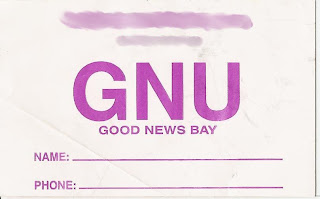 I used GIMP to smudge out the airline name and phone number, other than that it's exactly what it looked like when I pulled it out of my pocket and scanned it.
From Google maps here is a link to show you where this place actually is.
Here is a box tag from a local airline that services GNU:
 I used GIMP to smudge out the airline name and phone number, other than that it's exactly what it looked like when I pulled it out of my pocket and scanned it.
From Google maps here is a link to show you where this place actually is.
CLICK HERE
Okay, enough for now, I found it and thought it was fun. Sharing time is over.
~Az
p.s. I have landed there and gotten out of the plane, but didn't go looking around. It was a stop on the way to another village I was visiting.
Okay, enough for now, I found it and thought it was fun. Sharing time is over.
~Az
p.s. I have landed there and gotten out of the plane, but didn't go looking around. It was a stop on the way to another village I was visiting.
Friday, July 11, 2008
Sabayon 3.5
It's official, Sabayon 3.5 has been released as stable. It's time to say that it has truly come into it's own now. No longer simply a spin off of Gentoo it has improved upon it's parent by leaps and bounds. Foremost in this is the Entropy package manager, which simply put allows binary distribution of packages, similar to apt-get, pacman, urpmi, etc while still maintaining full compatablity with Gentoo's source based package distribution (Portage).While using a binary packager instead of source you loose one key function of Portage, you no longer have the option of tweaking USE flags, so the packages are more generic than system specific. However it does not rule out the possability of using Portage if you need the fine grained control over specific packages or your whole system.
The Entropy method does offer one huge advantage over Portage though, and that is in full system upgrades. No more do you spend days rebuilding modules, python, and packages that need specific options set. If you have ever done a Gentoo world upgrade you know the pain and frustration that it can become. Entropy allows the whole process to be completed using only a single command that happens at the speed of your internet connection. Then if you want or need to, you can recompile the specific packages you want uber control of.
While the Sabayon crew will tell you, and rightly so, that mixing and matching between Entropy and Portage is dangerous and possibly system destabalizing, I have not yet run into any real issues with it. Mind you I only take fine grained control of specific packages that I use every day, such as wine and firefox.
The speed and stability of Gentoo are still present as well as it's incredible selection of packages and other associated overlays. Now this may sound like this is simply a more user friendly version of Gentoo, but it is so much more. It is one of the most out of the box functional distributions that I have ever experianced. From having Compiz-Fusion active even from the LiveDVD without the need for additional drivers, to the wonderful suprise of finding that my network attached printer had been detected and configured without any interaction from me at all and finding ALL my media immeadiatly playable.
There is also a great dirth of information available for it that is more controlled and professional than other distributions. The level of incorrect or out of date fanboi help and how-to's is minimal. While nearly all of the Gentoo documentation is applicable to Sabayon (and a nod to THE BEST documenation of any Linux goes to the Gentoo folks) there is also Sabayon spefic docs that keep to the high standards that the Gentoo community maintains.
If your interested in having the speed and stability of a Gentoo based system with the improved ease of use and management of modern desktop, perhaps better than most. Also having the Out of the box functionality that so many users crave with little to no mucking about with things after installation, give Sabayon a try.
For those without a DVD drive needed to install Sabayon, there is a CD sized installer that contains a very minimal set of packages, or alternatly you can use the how-to I wrote for installing the DVD without actually having a DVD drive by booting from the .iso.
~Az
Friday, July 4, 2008
Happy 4th of July
Happy 4th of July everyone. This has nothing to do with Linux today, rather the condition of the United States. While traditionally this is the day we celebrate our declaration of freedom for the oppressive rule of a foreign monarch, I thought I would post a video as to how well the most basic tenet of how we accomplished this task is holding up.
If a picture says 1000 words, then this is nearly the library of congress. Lesson learned? If authorities ever come up to you without a warrant and ask if you have weapons ... well I wont say to say no, but use your best discretion. If you want to be able to continue your constitutionally guaranteed right of self defense I'm sure you can pick a proper response.
~Az
If a picture says 1000 words, then this is nearly the library of congress. Lesson learned? If authorities ever come up to you without a warrant and ask if you have weapons ... well I wont say to say no, but use your best discretion. If you want to be able to continue your constitutionally guaranteed right of self defense I'm sure you can pick a proper response.
~Az
Sunday, June 22, 2008
Awesomebar or Breach of Trust?
I just made the transition from Firefox 2 to Firefox 3 and my initial reaction was, well, underwhelmed. On further use though I realized that there is a horrid privacy issue that has existed for some time. It was the Awesomebar that brought this to light, which should be renamed by the way to the annoying bar. Anything that absorbs that much of my screen real estate and is that intrusive should have an easy way to turn it off.
That is not the privacy concern though. What really caught my attention was the fact that I have had Firefox set to not remember a thing. No history, flush the cache, cookies ... everything when I close the browser. If I want to revisit a site at a later date I bookmark it. Now with the advent of the Awesomebar I discovered that when I started typing in a URL that even though my history tab is empty that the Awesomebar was still pulling up the sites I had visited even though I had explicitly told it not to. What was more shocking was that I was seeing websites show up in there that I had visited prior to installing Firefox 3.
What in the world? There is a reason I dont want my browser to cache this stuff. I do not want anyone who walks up to my computer to be able to take a look at where I have been or what I have been researching. For one thing when I am at work I'm not really supposed to be going to sites like LXer or Groklaw, well, actually I can go there, I'm just not supposed to spend as much time as I do there. Or say I run across an interesting bit of news that sends me off on a knowledge hunt about the how or what of something. I realize that any of the IT folks who monitor network traffic could figure it out really quick, that's not my point though. My browser should NOT be caching this information against my express wishes.
Anyone, and I mean anyone with a little knowledge can walk up to your system and pull your history regardless of what you have told the browser to flush or not retain. This is not just breach of privacy, it's a breach of trust. I find it ethically questionable and morally reprehensible. So thanks to the Awesomebar for bringing this to my attention however my reaction after I sat down and thought about it for a few minutes was to start inventing a few new vulgar words to direct at the Firefox team.
Make no mistakes, this is not another undocumented "feature". This is a breach of public trust. Your browser is tracking EXACTLY what you have told it not to track or retain. I love using Firefox, but this revelation has set me to taking a serious look at other broswers for personal use, as should anyone who is concerned with personal privacy.
This is my call to Firefox. Fix it, and fix it now.
~Az
That is not the privacy concern though. What really caught my attention was the fact that I have had Firefox set to not remember a thing. No history, flush the cache, cookies ... everything when I close the browser. If I want to revisit a site at a later date I bookmark it. Now with the advent of the Awesomebar I discovered that when I started typing in a URL that even though my history tab is empty that the Awesomebar was still pulling up the sites I had visited even though I had explicitly told it not to. What was more shocking was that I was seeing websites show up in there that I had visited prior to installing Firefox 3.
What in the world? There is a reason I dont want my browser to cache this stuff. I do not want anyone who walks up to my computer to be able to take a look at where I have been or what I have been researching. For one thing when I am at work I'm not really supposed to be going to sites like LXer or Groklaw, well, actually I can go there, I'm just not supposed to spend as much time as I do there. Or say I run across an interesting bit of news that sends me off on a knowledge hunt about the how or what of something. I realize that any of the IT folks who monitor network traffic could figure it out really quick, that's not my point though. My browser should NOT be caching this information against my express wishes.
Anyone, and I mean anyone with a little knowledge can walk up to your system and pull your history regardless of what you have told the browser to flush or not retain. This is not just breach of privacy, it's a breach of trust. I find it ethically questionable and morally reprehensible. So thanks to the Awesomebar for bringing this to my attention however my reaction after I sat down and thought about it for a few minutes was to start inventing a few new vulgar words to direct at the Firefox team.
Make no mistakes, this is not another undocumented "feature". This is a breach of public trust. Your browser is tracking EXACTLY what you have told it not to track or retain. I love using Firefox, but this revelation has set me to taking a serious look at other broswers for personal use, as should anyone who is concerned with personal privacy.
This is my call to Firefox. Fix it, and fix it now.
~Az
Saturday, June 7, 2008
Fun and games.
While it's been awhile since I posted anything, the time has hardly been wasted. As with all things learning is a never ending cycle. That is pretty much what has been going on over the last few weeks, finding problems and then beating my head against them until I win.
The start of the process was when I decided that the OLPC XO I had picked up needed to do something useful, because to be honest, as it comes to you, it is a really interesting looking lime green brick. Just my opinion of it. Until I had started the process of doing something with it, the most useful thing I had done with it is get onto IRC via irssi. Curiously enough I did that via SSH'ing into the XO and then hitting IRC, that keyboard is too tiny for nearly any adult who doesnt have dwarfism.
After running through several iterations of Debian and Ubuntu I finally settled on one that works acceptably. So my XO is now attached to the back of my printer/scanner. It works as a cups/samba print server, a scanner controller via a vnc connection to the rest of the computers on the network using kooka, and a webserver for the network. The scanner drops it's images straight into the webserver to make retrieval easy for everyone on the network. If your curious the version that finally landed on my XO is a customized Ubuntu.
http://sprocket.io/blog/2008/05/ubuntu-hardy-heron-on-the-olpc-xo-1/
Of course part of this whole project required me to completely redesign my network. Which was fine. My old linksys router wouldn't handle static IP's. So I picked up another D-Link configured it to handle static IP's via it handing them out via DHCP. Since everything was static now it meant I could go in and set up the hosts file on all the computers, which was as easy as always, right up until I sat down to do my wifes Vista laptop. After a little research, it wasn't all that difficult, the real trick was finding it and editing it using proper permissions.
I also decided to try out a distro I hadn't ever used before, Arch Linux. I found it to be very not newbie friendly, but for anyone with some experience under their belt it was very straight forward to set up. Being touted as light weight, I have to say I have done smaller Debian installs. It weighed in without any X or other niceties at around 650-700 meg, still all things considered not bad. Since I was trying things different I decided to revisit e17 (enlightenment) for my GUI on that install. Setting it up was easy and I have to say I like it enough to keep playing with it.
Overall Arch doesn't offer the natural fine grained control over my system that I get using Gentoo/Sabayon. Speed wise it feels very snappy and responsive though and very complete. There will definitely be more playing with it to find the rest of it's weak points and strong points. From the start though, if your not a total noob and you want more control over your system and what is on it than most other distro's offer, Arch seems a really nice solution.
Good Computing
~Az
The start of the process was when I decided that the OLPC XO I had picked up needed to do something useful, because to be honest, as it comes to you, it is a really interesting looking lime green brick. Just my opinion of it. Until I had started the process of doing something with it, the most useful thing I had done with it is get onto IRC via irssi. Curiously enough I did that via SSH'ing into the XO and then hitting IRC, that keyboard is too tiny for nearly any adult who doesnt have dwarfism.
After running through several iterations of Debian and Ubuntu I finally settled on one that works acceptably. So my XO is now attached to the back of my printer/scanner. It works as a cups/samba print server, a scanner controller via a vnc connection to the rest of the computers on the network using kooka, and a webserver for the network. The scanner drops it's images straight into the webserver to make retrieval easy for everyone on the network. If your curious the version that finally landed on my XO is a customized Ubuntu.
http://sprocket.io/blog/2008/05/ubuntu-hardy-heron-on-the-olpc-xo-1/
Of course part of this whole project required me to completely redesign my network. Which was fine. My old linksys router wouldn't handle static IP's. So I picked up another D-Link configured it to handle static IP's via it handing them out via DHCP. Since everything was static now it meant I could go in and set up the hosts file on all the computers, which was as easy as always, right up until I sat down to do my wifes Vista laptop. After a little research, it wasn't all that difficult, the real trick was finding it and editing it using proper permissions.
I also decided to try out a distro I hadn't ever used before, Arch Linux. I found it to be very not newbie friendly, but for anyone with some experience under their belt it was very straight forward to set up. Being touted as light weight, I have to say I have done smaller Debian installs. It weighed in without any X or other niceties at around 650-700 meg, still all things considered not bad. Since I was trying things different I decided to revisit e17 (enlightenment) for my GUI on that install. Setting it up was easy and I have to say I like it enough to keep playing with it.
Overall Arch doesn't offer the natural fine grained control over my system that I get using Gentoo/Sabayon. Speed wise it feels very snappy and responsive though and very complete. There will definitely be more playing with it to find the rest of it's weak points and strong points. From the start though, if your not a total noob and you want more control over your system and what is on it than most other distro's offer, Arch seems a really nice solution.
Good Computing
~Az
Sunday, April 27, 2008
CD/DVD install with no CD/DVD
Want to install a DVD release of Linux but dont have a DVD drive or recorder? Your CD/DVD drive has died but you still want to install a new or updated version of Linux? You can, and you can do it all from your hard drive without burning a single CD or DVD.
**UPDATE** 17Oct08
I finally did a write up for how to make a bootable USB from a DVD image. If you have a 4 Gig or larger thumbdrive handy give it a try.
Again, Happy Computing
~Az
To start we need to make a partition for the image to reside on. Two bits of advice, put the partition at the very end of the drive so you can recover the HD space later on if you wish. It's easy to add more room to the end of a partition but nearly impossible to add more room at the beginning of a partition. The second bit is, if you have no working CD/DVD drive at all you will need another way to resize your drives, for this I recommend going to http://www.pendrivelinux.com. They have a great list of thumb drive installs and how-to's, as well as their own version aptly called pendrivelinux which is great. You'll have to install gparted on it but still, very handy and a must have for your toolkit.
Okay, one way or another we now have a way to resize the drive, my personal preference is gparted. For the next step the size of the .iso we will be working with is needed. The one I will be using in this example is 3.9 Gig so I need 3.9 Gig plus a little bit for a fudge factor. A few hundred meg should be sufficient, however in my case I want to also back up some critical data so I bumped it to 5 Gig. You dont have to, but this is a great way to back up things you want to have readily available after you install. The minimum though is .iso size plus a bit, say 10% of .iso size.
You can use gparted to make this partition ext2 or you can issue the following command to do it. As root:
mkfs -t ext2 /dev/sda4
Where /dev/sda4 is the partition you just created, /dev/sda4 was mine. Make sure to change it to the one you actually made.
Next we need to get ready to start putting things together. All of the commands we will be using for this need to be issued as root so you might as well go there and stay there for awhile.
mkdir /mnt/iso
mkdir /mnt/target
mount -t ext2 /dev/sda4 /mnt/target
(note here, /dev/sda4 needs to changed to the one you made)
mount -o loop -t iso9660 /path/to/image /mnt/iso
(note here, for me this would be /home/jim/dls/Sabayon-Linux-x86-3.5-Loop2-r2.iso . Yours will differ, adjust accordingly)
cp -rvp /mnt/iso/* /mnt/target
Great almost done, but now your going to have to do a little thinking. We have to get what we just did to boot. Since the example I'm using probably wont be the one you will be using I will point out the changes you need to make. Regardless it's fairly straightforward.
We need to figure out the configuration we need to feed to GRUB to actually fire this up. Luckily 99% of this has already been done for us by whoever released the liveCD/DVD.
cd /mnt/target
ls -l
look around here for either isolinux.cfg or syslinux.cfg, if it is not in this directory
cd isolinux
ls -l
and look for it in this directory.
Once you have found it:
cat isolinux.cfg (syslinux.cfg if thats what you have)
You are going to get a lot of stuff here, we are actually only concerned with a little bit. The line LABEL is what we are looking for, the first one usually but read the LABEL to make sure its the one your looking for. In my case:
LABEL sabayon
menu label ^Start SabayonLinux 3.5 Loop2
kernel /boot/sabayon
append root=/dev/ram0 initrd=/boot/sabayon.igz aufs init=/linuxrc cdroot looptype=squashfs max_loop=64 loop=/livecd.squashfs splash=silent,theme:sabayon vga=791 CONSOLE=/dev/tty1 quiet music --
Is the one I want. When you see the next line that says LABEL, that is a seperate boot entry and you wont need it. Now we need to make a few changes to it, to make it bootable from GRUB.
title sabayon
root (hd0,3)
kernel /boot/sabayon root=/dev/ram0 aufs init=/linuxrc cdroot=/dev/sda4 looptype=squashfs max_loop=64 loop=/livecd.squashfs splash=silent,theme:sabayon vga=791 CONSOLE=/dev/tty1 music quiet --
initrd /boot/sabayon.igz
First you'll see I changed it from LABEL to title and removed the menu label line.
Second you'll see I added root(hd0,3). You'll need to adjust this to match where you extracted the .iso image. GRUB counts from 0 so drive 1 = 0 and partition 4 = 3. sda3 would be (hd0,2) sdb3 would be (hd1,2) and so on.
Third you will see that I left the kernel line alone.
Fourth you will see that I removed the word append and then moved the whole thing up so it follows the original kernel line. Then moved initrd=/boot/sabayon.igz to it's own line at the very bottom. Following that a bit further you will also find that where it says cdroot I added the actual partition where we extracted the .iso.
Note that while it looks complex, and the one you will be looking at will probably look significantly different your only actually making a small handful of changes. Just make the small edits as described leaving the rest alone and you'll be golden.
Okay, lets say you now have your entry figured out. Now you simply have to edit /boot/grub/grub.conf and add it to the very end of that file. This file has to be edited as root, and make sure you dont over write anything that is in there already.
Save the file, reboot, and you should see the entry for the LiveCD/DVD as an option in your boot menu.
Once your done you can safely remove the partition you made and reclaim the space using gparted again, or leave it in place and have an emergency boot, although you will have to add the lines back into GRUB if you overwrote your last one if/when you installed.
I wish I could take full credit for this, however I cant. I was working on making a USB variant of this, and was almost there but was having a few problems with it when jvj posted an almost line for line how to in the sabayon wiki. I want to thank him for pointing out that cdroot needed to be pointed to the partition, which is where I was stuck at. Since we both use Sabayon and Loop2 is the most current beta at the time of the writing that is why so much of his wiki entry and my how to look so similar.
Anyway, thanks jvj, and to the rest of you, happy computing.
~Az
*UPDATE* 07July08
I'm happy to say that Sabayon 3.5 has officially been released and that the above how-to has been tested against it and it worked perfectly. Here is the grub.conf entry I used to get it working on my laptop.
Remember you will have to adjust root (hd0,3) and cdroot=/dev/sda4 to reflect your actual system as explained in the above article. Due to formatting issues of the blog I should point out that everything from kernel /boot/sabayon to quiet -- is actually one long line.title Sabayon 3.5 Install/LiveDVD
root (hd0,3)
kernel /boot/sabayon root=/dev/ram0 aufs init=/linuxrc cdroot=/dev/sda4 looptype=squashfs max_loop=64 loop=/livecd.squashfs splash=silent,theme:sabayon vga=791 CONSOLE=/dev/tty1 quiet --
initrd /boot/sabayon.igz
**UPDATE** 17Oct08
I finally did a write up for how to make a bootable USB from a DVD image. If you have a 4 Gig or larger thumbdrive handy give it a try.
Again, Happy Computing
~Az
Subscribe to:
Posts (Atom)